AI Portfolio Generator
Building a diversified portfolio is no easy task. What investors usually know is how much money they want to invest and in which currency. aivest builds a globally diversified stock portfolio from just this input.
This website is a demonstration for information purposes. It works with real market data (stock prices are updated every trading day after the US market close, exchange rates every working day from the reference rates of the European Central Bank), but the portfolios it generates are not investment advice.
A portfolio holds up to 20 stocks from a universe of about 2,000 of the world's most heavily traded companies. How many depends on the amount: roughly one per 500 US dollars (or the equivalent in your currency), at least 3, so the full 20 start at about 10,000 US dollars.
Which stocks end up in the portfolio follows market liquidity: large, heavily traded companies are drawn more often than small ones, so across all users the portfolios reflect the global stock market the way it is actually traded. The weights are then chosen to keep the portfolio's fluctuations (its volatility) low.
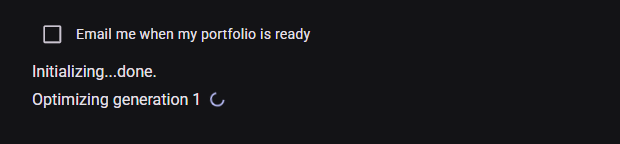
Where the AI comes in: the portfolio is put together by a genetic algorithm, an AI method that evolves many candidate portfolios over generations and keeps the best (the generation counter you see during an optimization). An AI language model also helps to check the data of the roughly 2,000 companies once a month. The AI does not predict prices.
Worth knowing:
- Portfolios differ between users. The selection contains a random element on purpose: if everyone received the same "best" stocks, all demand would concentrate on a handful of names. Two portfolios created on the same day with the same amount will usually look different, and both are equally valid.
- The goal is lower risk, not higher returns. In historical tests, aivest portfolios fluctuated clearly less than a simple equal split across the largest companies. They are not designed to beat the market, and no portfolio can promise a result.
- Every portfolio is checked before you see it. Each new version must pass a quality check of its risk profile. If none passes, you receive an error message instead of a weaker portfolio.
The optimizer shown on this website is one example. Financial service providers offering aivest to their customers can adapt it in many ways, for example with other instruments or asset classes, their own data, different risk settings or their own cost schemes. If you are interested in licensing aivest services or APIs, please contact us at info@aivest.com.
Where Markowitz comes in. The weights within a portfolio are chosen with mean-variance methods that go back to Harry Markowitz (1952; Nobel Memorial Prize in Economic Sciences 1990): the optimizer weighs expected return against the portfolio's fluctuation, using how the stocks moved together in the past. Which stocks are in the portfolio, however, follows market liquidity and a deliberate random element, not Markowitz's theory. aivest portfolios therefore do not lie on his "efficient frontier", and they are not meant to.
Further reading: Harry Markowitz, Modern portfolio theory
Statistics
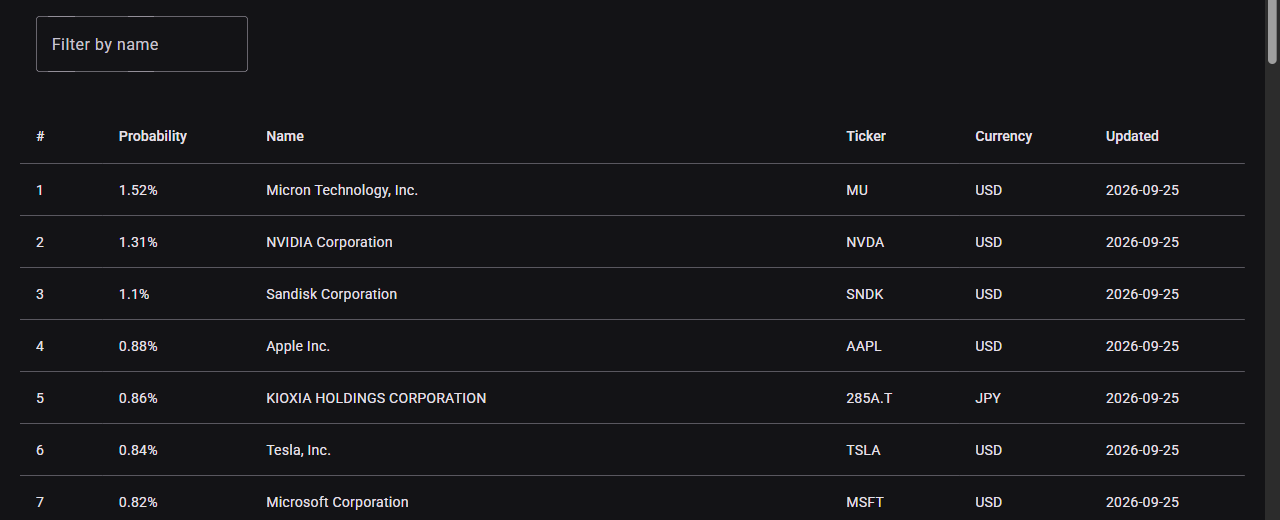
The Statistics page lists every stock the optimizer can currently choose from, together with the probability that it is drawn into a portfolio. The list is updated regularly from market data.
Login / Register
Register a new account or choose "Login" to access an existing one.

Registration needs a user name, your e-mail address and a password. You will receive an e-mail to confirm your address. We use your e-mail address only for your account (confirmation and password reset), never for advertising.
Create a Portfolio
Once you are logged in, open Your portfolios. If you do not have a portfolio yet, you will be asked for a name, the available funds and the currency right away; later you create more portfolios with Create.
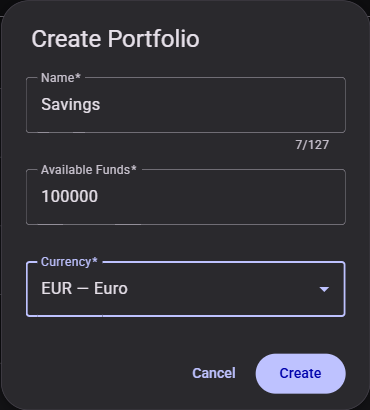
- Available Funds: the amount you want to invest, between the equivalent of 500 and 500,000 US dollars. It also decides how many positions the portfolio gets (see AI Portfolio Generator).
- Currency: the currency you invest in. It cannot be changed later.
The currency matters: stocks traded in other currencies also carry exchange-rate risk, and the optimizer takes the historical exchange-rate movements into account.
Portfolio Optimization
After Create, aivest shows the notice for the calculation: what the result is and what it is not, for example investment advice. Only when you confirm that you have read it and press Start does the optimization begin, and you can follow its progress. This applies to every optimization, later ones included. It usually takes well under a minute; when many users optimize at once, your portfolio waits in a queue and the progress view shows how many are ahead. The optimization runs on our servers, so you can leave the page: tick Email me when my portfolio is ready and we send you an e-mail when it is done.
The result is a list of up to 20 positions:
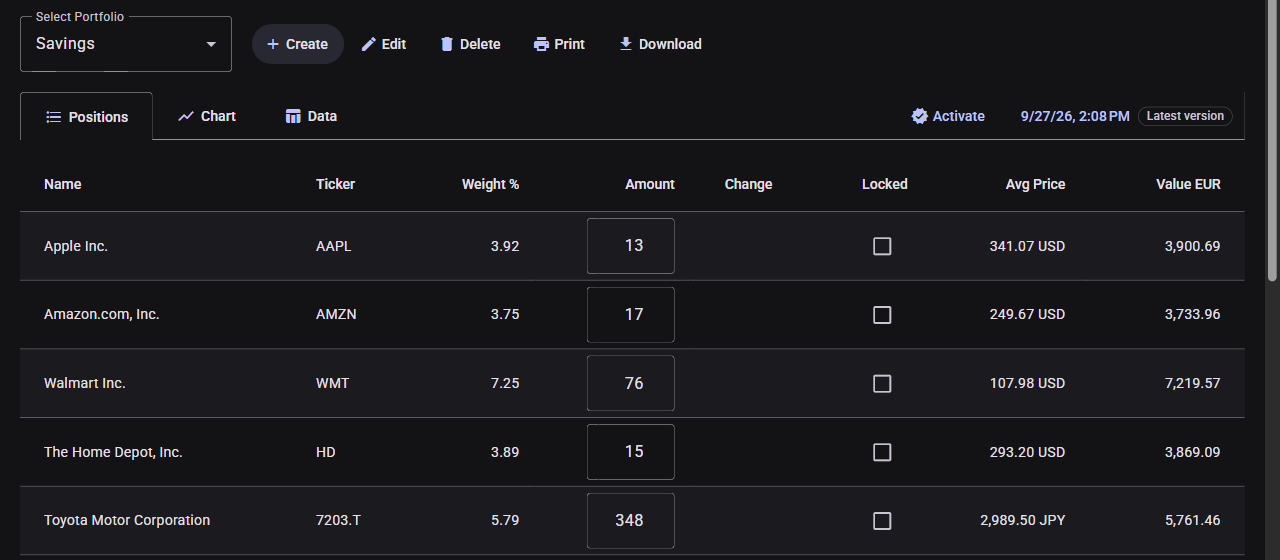
- Weight %: the share of this position in the portfolio.
- Amount: the number of shares of each stock in this variant.
- Change: the calculated difference in shares from the active version (+ more, - fewer; see Versions). It is not a recommendation to buy or sell.
- Locked: see Adjust Positions.
- Avg Price: the price at the time this version was calculated, in the stock's own currency.
- Value: the value of the position in your portfolio currency.
Print and Download (CSV) save the list; both carry the note that it is not investment advice. Edit renames the portfolio or changes its available funds; saving it starts a new optimization. Delete removes the portfolio.
Versions
Every optimization creates a new version of your portfolio. Nothing is overwritten: all earlier versions stay available, so you can always see what was calculated when.
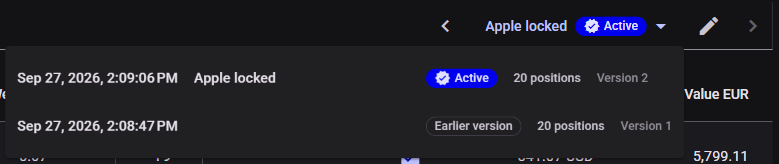
The version bar next to the tabs shows the version on screen (its name, or the date and time it was requested) and its status:

- Active: the version you are working with. You mark it yourself.
- Latest version: the newest optimization result.
- Earlier version: an older result that is not active.
The pencil gives a version a name of up to 30 characters, such as "Apple locked"; Enter saves it, Esc discards it. Without a name, the bar shows the date and time again. Any version can be named.

Use the arrows or the menu to switch between versions:
Activate marks the version on screen as the one you are working with. This matters, because the active version is the starting point for everything that follows:
- Only the active version can be edited (as long as you have not activated any version, the latest one). All other versions are read-only.
- The next optimization starts from its positions.
- The Change column shows the calculated difference between the active version and the one on screen.
A typical cycle:
- Create a portfolio and review the first version.
- Whether and what you buy is your decision. If your holdings match this version, press Activate.
- Later, adjust positions or the available funds, press Save & Optimize, confirm the notice and press Start.
- A new version appears. The Change column shows how it differs from your active version:
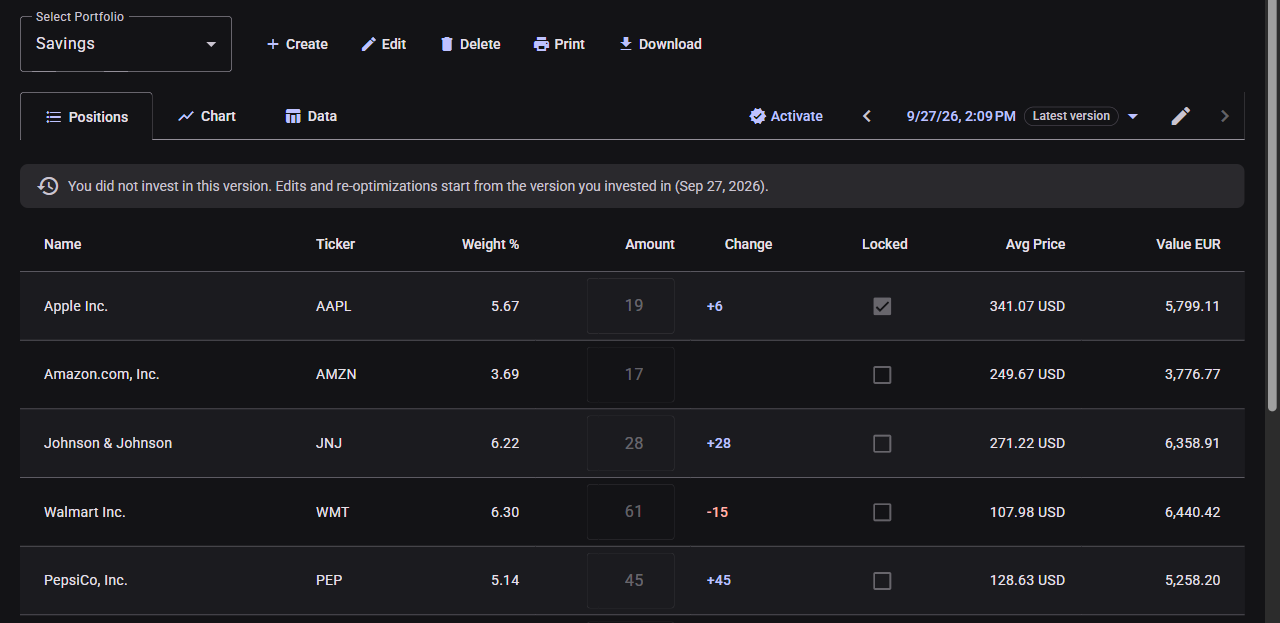
- Whether you change anything is your decision. If you bring your holdings in line with the new version, Activate it; otherwise simply keep your active version, and the new one remains in the history.

Adjust Positions
On the active version you can change amounts and lock positions before you optimize again:
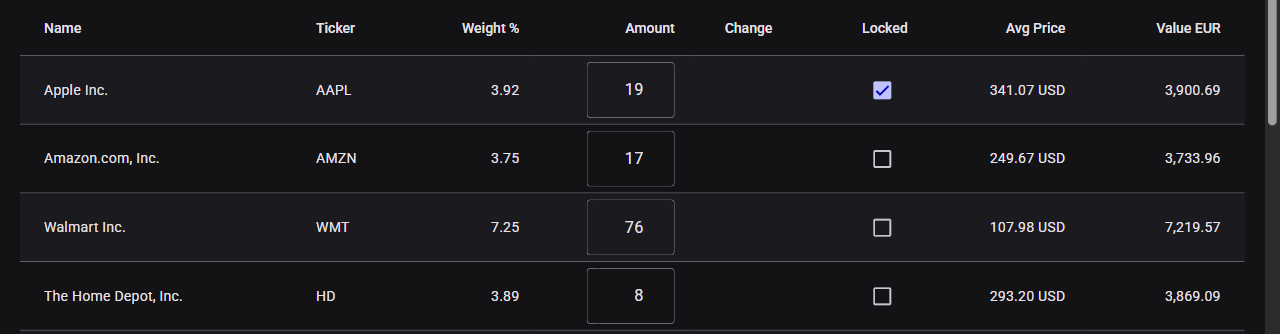
- Changing an amount without locking it only gives the optimizer a starting point; it may change the number again or even drop the stock.
- Locked keeps a position at exactly the amount you entered.
- Amount 0 and Locked excludes a stock: it will not appear in this or any later version until you unlock it.
Changes only take effect with Save & Optimize (and Start after the notice), which creates a new version. In the example above, Apple was locked at 19 shares and kept exactly that. Home Depot was reduced from 15 to 8 shares without locking, and the optimizer dropped it entirely, because an unlocked number is only a starting point.
A new optimization starts from your active version and tries to keep changes small, but may still adjust many positions or replace stocks; check the Change column before you decide.
Acting on a new version means trades, and trades cost fees. Optimizing again pays off mainly when the amount changes, not every day.
Extensive locking can make it impossible to build a portfolio. In that case you will get a message explaining what to change.
Chart
The Chart tab shows how the positions of the selected version would have developed.
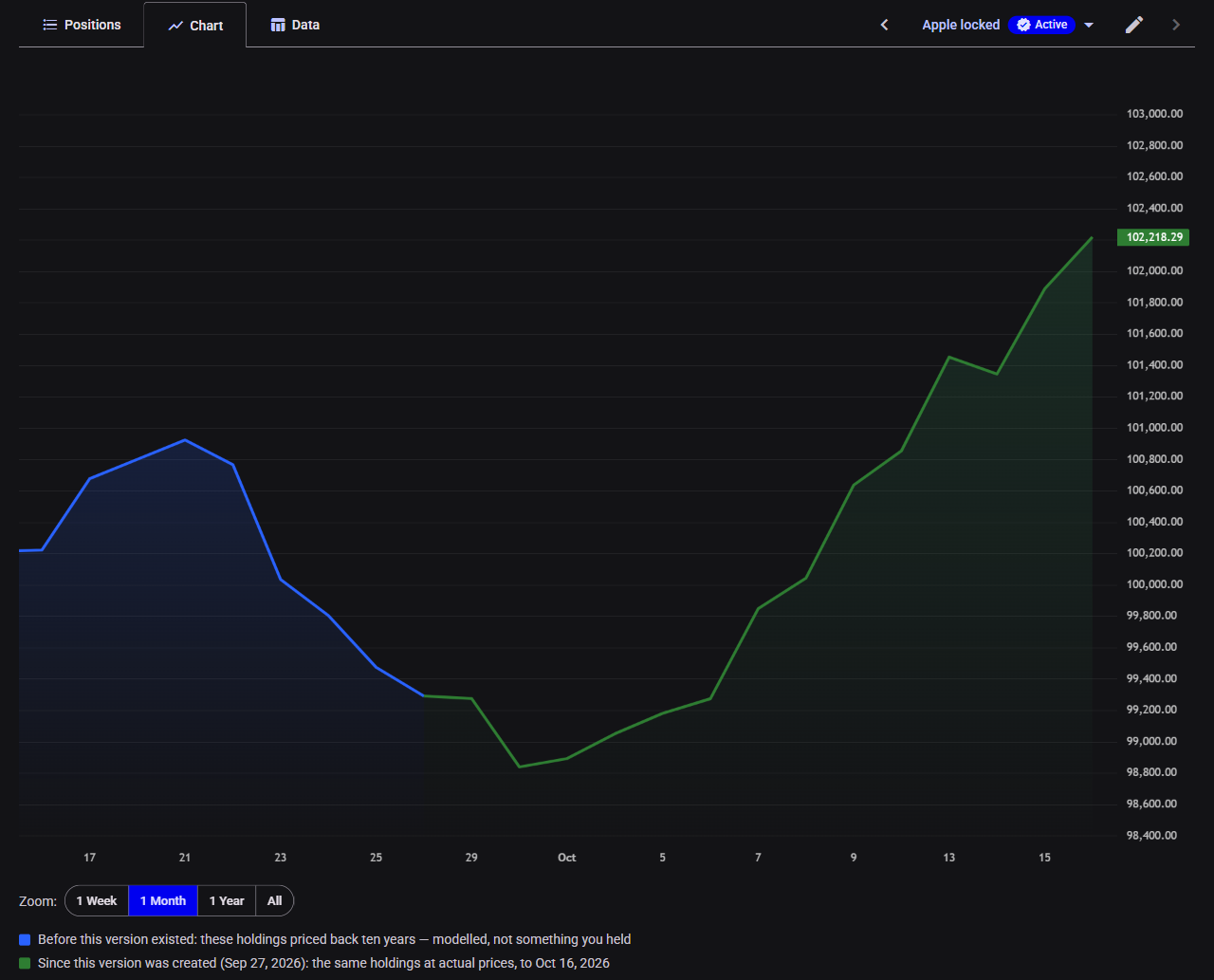
- Blue, before this version existed: its positions priced back ten years. This is a model, not something you held, and it looks better than reality would have: it contains only companies that are still successful today, and the optimizer chose the positions knowing this history.
- Green, since the version was created: the same positions at actual prices. For a new version this part is still empty.
Zoom below the chart shows the last week, month or year, or everything; the vertical axis adapts to the period shown. The mouse wheel and dragging zoom and move the chart freely.
If a stock is delisted and its prices stop, the chart counts it as worthless from its last price on and names it below the chart.
Past performance is not a reliable indicator of future results.
Data
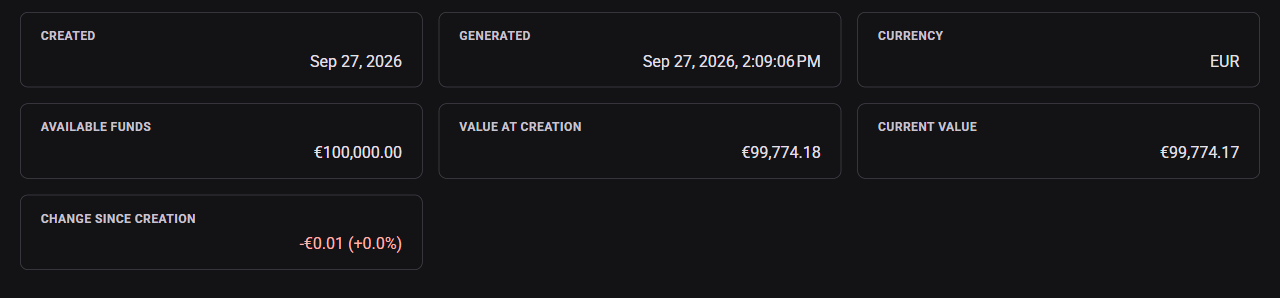
The Data tab summarizes the selected version: when the portfolio was created and this version was generated, the currency, the available funds, the value at creation, the current value and the change since creation.